
How to apply population weights in Stata
Welcome to the Stata Guide on applying population weights to survey data! Learning how to correctly implement this process significantly increases the validity of your analyses and results.
Throughout this guide, blue phrases will be used to indicate commands, green phrases for variables, and purple for links and downloads.
We’ll be using an adjusted version of the first file from the National Health and Nutrition Examination Survey (NHANES). The link can be found here. The dataset contains a breadth of demographic information which we will be learning how to clean and preprocess.
Here is the .do file which you can use to follow the guide with.
Begin by downloading the data, saving it in a folder, setting this folder as the working directory, and loading the dataset into Stata.
Install and open the relevant packages in the library through the following:
Throughout this guide, blue phrases will be used to indicate commands, green phrases for variables, and purple for links and downloads.
We’ll be using an adjusted version of the first file from the National Health and Nutrition Examination Survey (NHANES). The link can be found here. The dataset contains a breadth of demographic information which we will be learning how to clean and preprocess.
Here is the .do file which you can use to follow the guide with.
Begin by downloading the data, saving it in a folder, setting this folder as the working directory, and loading the dataset into Stata.
Install and open the relevant packages in the library through the following:

How is a Survey’s Design Specified?
The NHANES is a broad project which spans a variety of different surveys and topics. Its goal is to “assess the health and nutritional status of adults and children in the United States” (ICPSR, 2025). In the file of it that we’ve been using, we have four important variables related to the survey’s design and how it’s meant to be analyzed:
WTINT2YR: Full Sample 2 Year Interview Weight
WTMEC2YR: Full Sample 2 Year MEC Exam
SDMVPSU: Weight Masked Variance Pseudo - PSU
SDMVSTRA: Masked Variance Pseudo-Stratum
WTINT2YR: Full Sample 2 Year Interview Weight
WTMEC2YR: Full Sample 2 Year MEC Exam
SDMVPSU: Weight Masked Variance Pseudo - PSU
SDMVSTRA: Masked Variance Pseudo-Stratum
So, what do these mean and how do they allow us to specify something about the survey’s design?
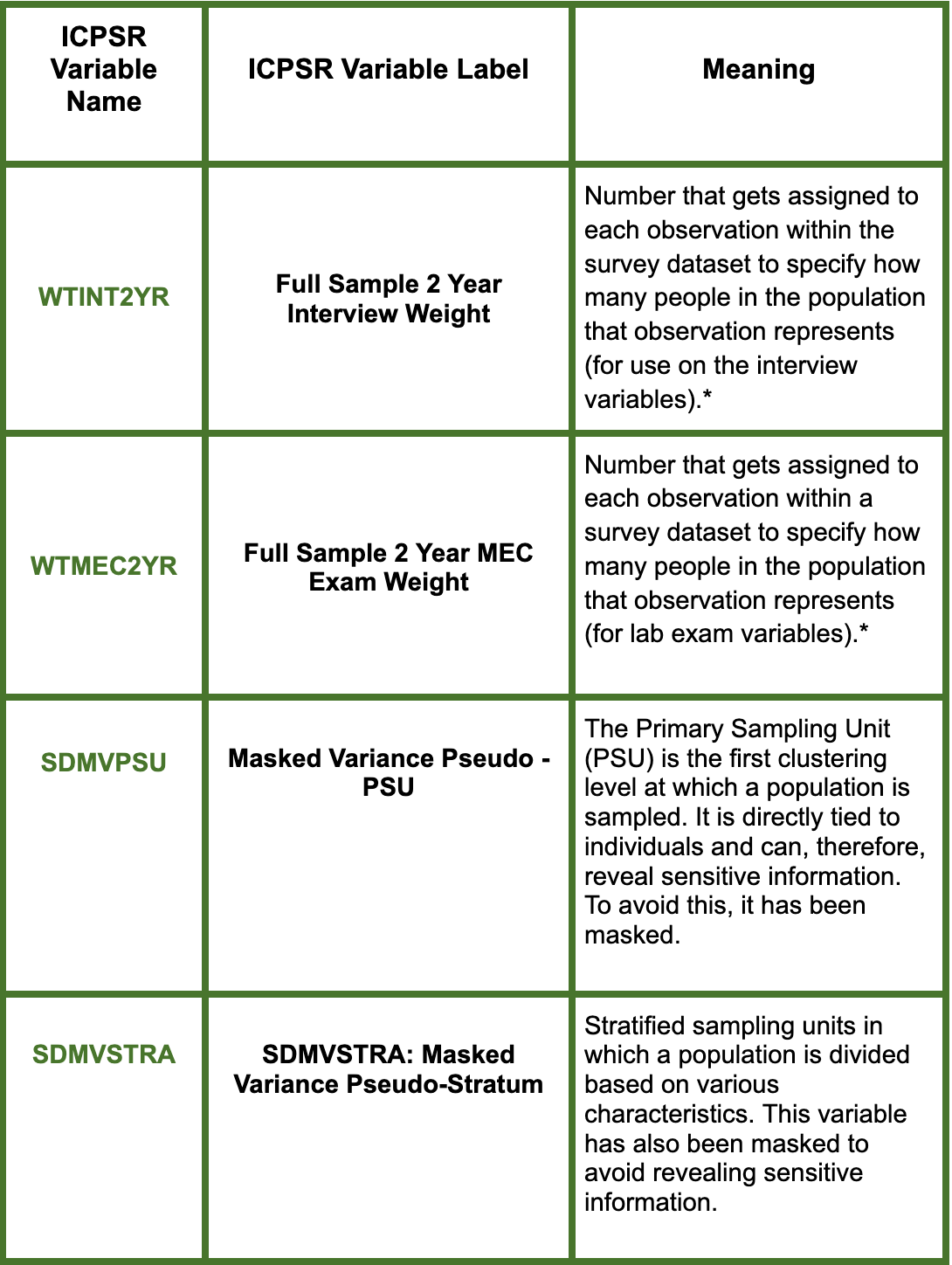
*WTINT2YR and WTMEC2YR are both sampling weights but while the first is to be used in relation to interview data, the second should be used for exam data. In our case, we will be focusing on WTINT2YR since the demographic variables have been collected through conducted interviews. WTMEC2YR is used on the elements of the survey which would need to be collected by a lab exam (i.e. blood glucose levels).
** Here is a small diagram from ‘Statistical Aid’ for help on visualizing the stages of sampling utilized within a survey’s sampling.
Now that we’ve learned about the four variables in the dataset related to the survey’s design, let’s use the appropriate ones to specify the survey characteristics in Stata.


We’ve now successfully adjusted the settings in Stata for the appropriate design specification. You can now run analyses with the correct specifications that will ensure accuracy!
Congrats on making it to the end of this Stata guide!
By: Zoe Pyne
Congrats on making it to the end of this Stata guide!
By: Zoe Pyne