
How to merge datasets in R
In this tutorial:
- How to merge Data Sets
- Inner, Outer, Left, Right Join
- Tips for Merging
Sometimes we have information spread across multiple datasets. Let’s say you have a dataset of people’s names and IDs, and a second one with their test scores using those same IDs. In this tutorial, we'll go over how to combine them using dplyr.
To merge datasets in R:
By default, R executes an inner join when merging data sets. This means it will keep only the rows where the key variable matches in both datasets. But there are other types of joins you can use depending on what you want to keep:
R
# Load the package or install if you haven't done so yet
install.packages("dplyr")
library(dplyr)1. Adding Columns
To merge two datasets horizontally, that is, to add columns, we typically use the merge() function in base R or the join functions from dplyr. In most cases, we join two datasets by one or more key variables (for example, id).By default, R executes an inner join when merging data sets. This means it will keep only the rows where the key variable matches in both datasets. But there are other types of joins you can use depending on what you want to keep:
- Left join: Keeps all rows from the left dataset, adding matching rows from the right dataset. If there’s no match, it fills in with NA for the right-side variables.
- Right join: Keeps all rows from the right dataset, adding matching rows from the left dataset. Unmatched rows on the left get NA.
- Full (outer) join: Keeps all rows from both datasets, matching where possible, and filling in NA when there’s no match on either side.
- Inner join: Keeps only rows where the key variable matches in both datasets (this is the default behavior of merge()).
R
# merge two data frames by ID
total <- merge(data_frameA, data_frameB, by = "ID")

# merge two data frames by ID and country
total <- merge(data_frameA, data_frameB, by = c("ID", "country"))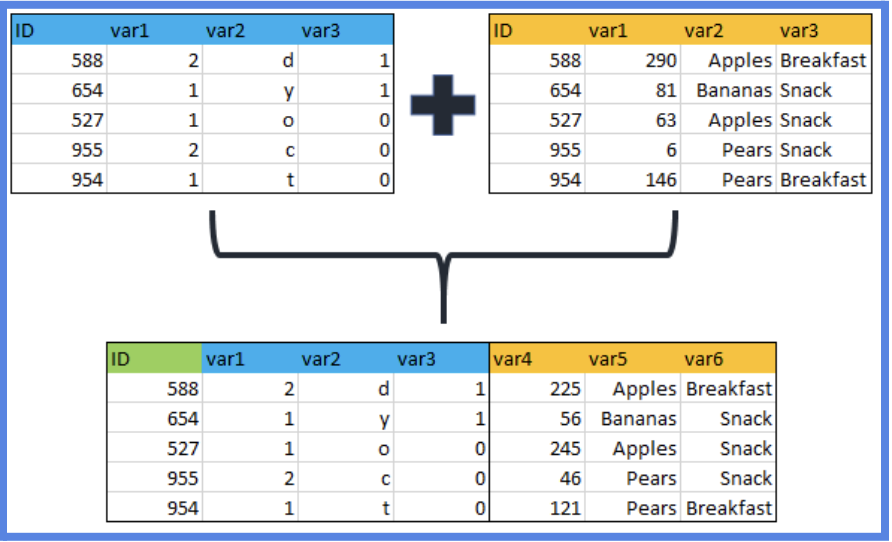
2. Adding Rows
To join two data frames (datasets) vertically, use the rbind function. The two data frames must have the same variables, but they do not have to be in the same order.
NOTE: If
dataframe_A has variables that dataframe_B doesn't have, either delete the extra variables in dataframe_A or create the additional variables in dataframe_B and set them to NA.
R
total <- rbind(data_frameA, data_frameB)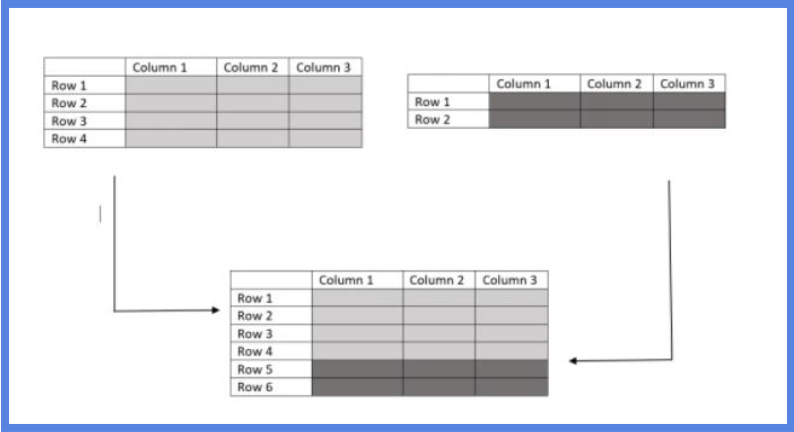
Tips:
- Understand Your Data: Before merging, always inspect your datasets using functions like head(), str(), and summary()
- Choose the Right Key Variables: Ensure that the variables you're merging on are unique and don't have duplicates unless it's intentional. This prevents unintended data duplication.
- Specify Merge Type: R's merge function allows for different types of joins: left, right, inner, and outer. Understand the differences and choose the one that best fits your needs. left: includes all rows from the first dataset and matching rows from the second. right: includes all rows from the second dataset and matching rows from the first. inner: includes only rows with matching keys in both datasets. outer: includes all rows from both datasets.
- Handle Missing Values: After merging, check for NA values. These can arise if there's no match for a particular key. Decide how you want to handle these: remove, replace, or impute.
By: Sofia Covarrubias